Day 4 - Basic Linux Shell Scripting for DevOps Engineers
Day 4 : #90DaysOfDevOps Challange
What is Shell Scripting for DevOps?
The kernel is the main component of a Linux operating system (OS) and is the core interface between a computer’s hardware and its processes and it has complete control over everything in the system.
The shell is the Linux command line interpreter. It provides an interface between the user and the kernel and executes programs called commands. Shell accepts human-readable commands from users and converts them into something which the kernel can understand.
Shell scripting is a program to write a series of commands used to automate the tasks written in the .sh file. Shell scripting is an important part of process automation in Linux and it is used to automate repetitive tasks and streamline the development and deployment process. The scripting file starts with #!/bin/bash
Syntax:-
#!/bin/bash
<commands>
The file to be created must be with extension ".sh" and provided with necessary execute permissions to the user running the script.
A shell script involves the following basic elements:
Shell Keywords – if, else, break, etc.
Shell commands – cd, ls, echo, pwd, touch etc.
Functions Control flow – if..then..else, case and shell loops, etc.
What is #!/bin/bash? Can we write #!/bin/sh as well?
Any shell script is identified by Shebang or hashbang(#!). Shebang is a combination of bash(#) and bang(!), followed by the shell path.
The shebang(#!) at the head of a script tells your system that this file is a set of commands to be fed to the command interpreter.
/bin/sh and /bin/bash are both Unix/Linux shell interpreters, but they have some differences in their behavior and syntax. /bin/sh is a POSIX-compliant shell that is designed to be small and efficient, while /bin/bash is a more feature-rich shell that includes many additional features and extensions.
For example, some features such as arrays and some string operations are not available in /bin/sh, but they are available in /bin/bash. Additionally, /bin/bash provides more extensive support for interactive shell features such as command history, auto-completion, and job control.
We can write #!/bin/sh in place of #!/bin/bash, the difference is just in shells 'sh' means Bourne Shell and 'bash' means Bourne Again Shell. Bash shell scripting is a kind of shell scripting only. You can say, it's a subset of shell scripting. The Bourne Shell is another commonly used shell in Unix-based operating systems.
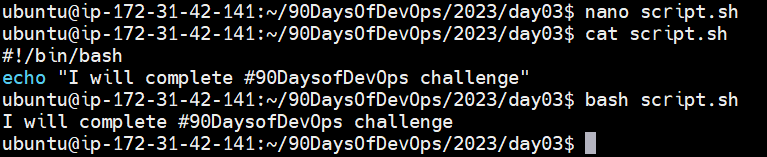
Write a Shell Script that prints I will complete #90DaysOofDevOps challenge
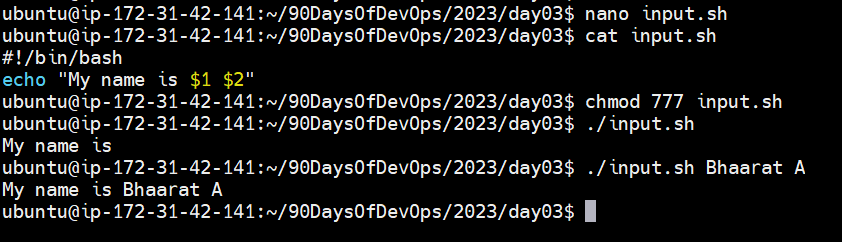
Write a Shell Script to take user input, input from arguments and print the variables:
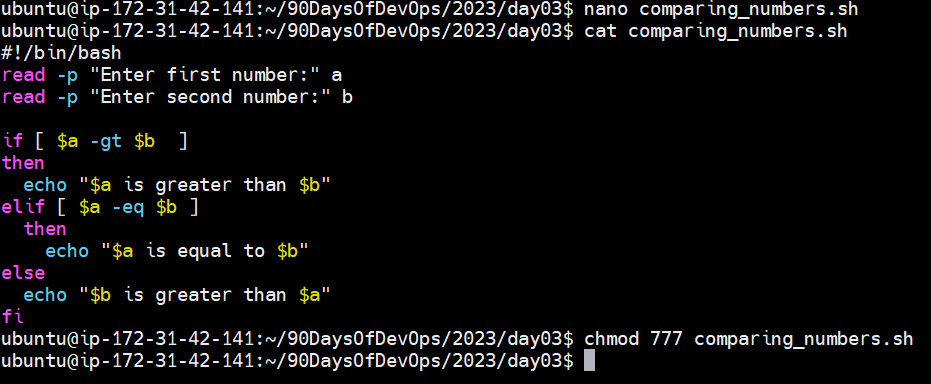
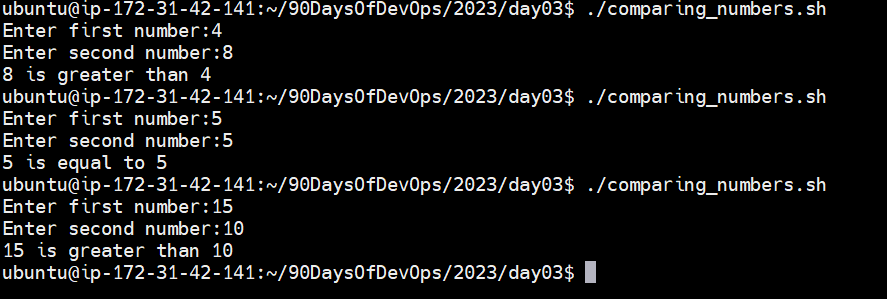
Write an Example of If else in Shell Scripting by comparing 2 numbers:
Thank you for reading!!!
~Bhaarat


