Day 2 - Basic Linux Commands
What is Linux?
Linux is an open-source operating system that is made up of the kernel. The OS kernel was first published on 17 September 1991 by Linus Torvalds. The OS sits between applications and hardware and makes the connections between all of your software and the physical resources that do the work.
Linux Applications:
Servers
Linux is the most popular operating system for web servers. It's also used in supercomputers and embedded systems (devices like smartphones).Supercomputers
Linux powers more than half of the world's top 500 fastest supercomputers, including Summit at Oak Ridge National Laboratory which was recently ranked as number 1 with a peak performance of 200 petaflops (200 quadrillion calculations per second).
Benefits of Linux:
Stable
Linux is a stable operating system that has been around for decades. It's used in everything from servers to supercomputers, and it's proven itself to be reliable in all kinds of situations.Reliable
Linux has been built to be reliable from the start--and it shows! You can count on your Linux-based systems to work as they should, every time you turn them on or reboot them after an update or upgrade (which we'll talk about later).Secure
Linux has always had good security features baked right into its core architecture; these include things like firewall settings that prevent unauthorized access attempts by hackers trying to break into your network through an open port on one of your computers' network cards (NCs).
Linux Distributions:
Linux distributions are the operating systems that you can install on your computer. There are many different Linux distributions available, but we're going to focus on the most popular ones:
Debian
Ubuntu
Fedora (Red Hat)
Arch Linux
openSUSE
Linux Desktop Environments:
There are several desktop environments available for Linux, with each offering its unique look and feel. For example, GNOME is one of the most popular desktop environments in use today. It's based on the GTK+ toolkit and uses the Mutter window manager as its compositor.
KDE (K Desktop Environment) is another popular option that offers a wide range of applications and tools for users' needs. Xfce is another lightweight desktop environment that focuses on speed and low resource usage; it's also compatible with many different types of hardware configurations.
LXDE was designed to be lightweight enough so that it can run well even on older computers or netbooks--it features an extremely minimalistic interface but still provides all the basic functions needed by most users like browsing web pages and opening files/documents etc. Cinnamon has been around since 2012 but has since gained popularity due to its user-friendly nature while still maintaining some advanced features such as multi-monitor support, customizable themes/stylesheets etc.
Command Line Interface:
The shell is the command line interface that you use to interact with Linux. It's what you see when you open up a terminal window and type in commands, like ls or cd. There are many different shells available for Linux, but two of the most popular ones are Bash and Zsh.
Bash stands for Bourne Again SHell (named after its creator), while Zsh stands for Z-Shell (named after itself). Both shells offer some advanced features such as aliases (shortcuts), tab completion, command history tracking, etc., but they differ slightly in their syntaxes and overall feel.
Csh is another popular shell used on older versions of Unix systems like Solaris or HP-UX; however, it has fallen out of favor with modern developers due to its lack of features compared to other options available today such as Bash & Zsh
Package Management:
Package management is the process of installing, upgrading, configuring and removing software packages. Package managers typically handle dependencies automatically and can be used to install multiple packages at once.
Linux has several different package managers:
APT (Advanced Package Tool) is a command line tool that handles Debian-based systems such as Ubuntu and Linux Mint. It's similar to Yum in functionality but has fewer features than RPM or Pacman.
Yum is another command line tool that handles Red Hat-based systems like Fedora or CentOS. It's similar to Apt but has more features Apt does not handle dependency resolution by default so you'll need to use additional tools such as yum-utils or DNF (Dandified YUM).
RPM (Red Hat Package Manager) is a third-party application that allows you to install software packages on Red Hat Enterprise Linux machines without having root privileges on your computer!
Linux Security:
Linux security is a combination of user authentication, firewall, file permissions and encryption.
User authentication: In Linux, you must be logged in as root or with another administrative account to make changes to system files or install software packages.
Firewall: A firewall blocks unauthorized access from outside your computer network by controlling traffic between networks that are connected through routers or gateways (a device that allows communication between two networks).
File permissions: Every file has three types of permissions associated with it: read (r), write (w), and execute(x). If someone tries to access a file but does not have permission for any of these three types then they will not be able to access it at all!
Encryption: Encryption is used when data needs protecting so that only authorized users can see it; this prevents hackers from accessing sensitive information stored on your computer.
Architecture of Linux
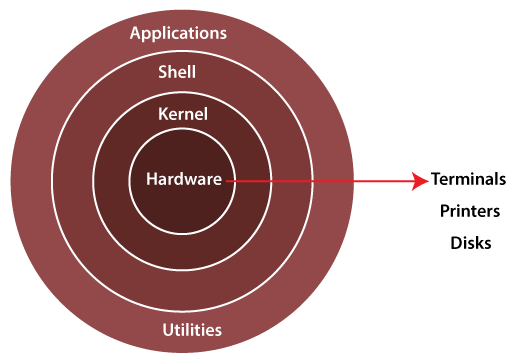
The Linux kernel is the main component of a Linux operating system (OS) and is the core interface between a computer’s hardware and its processes.
The shell is the Linux command line interpreter. It provides an interface between the user and the kernel and executes programs called commands.
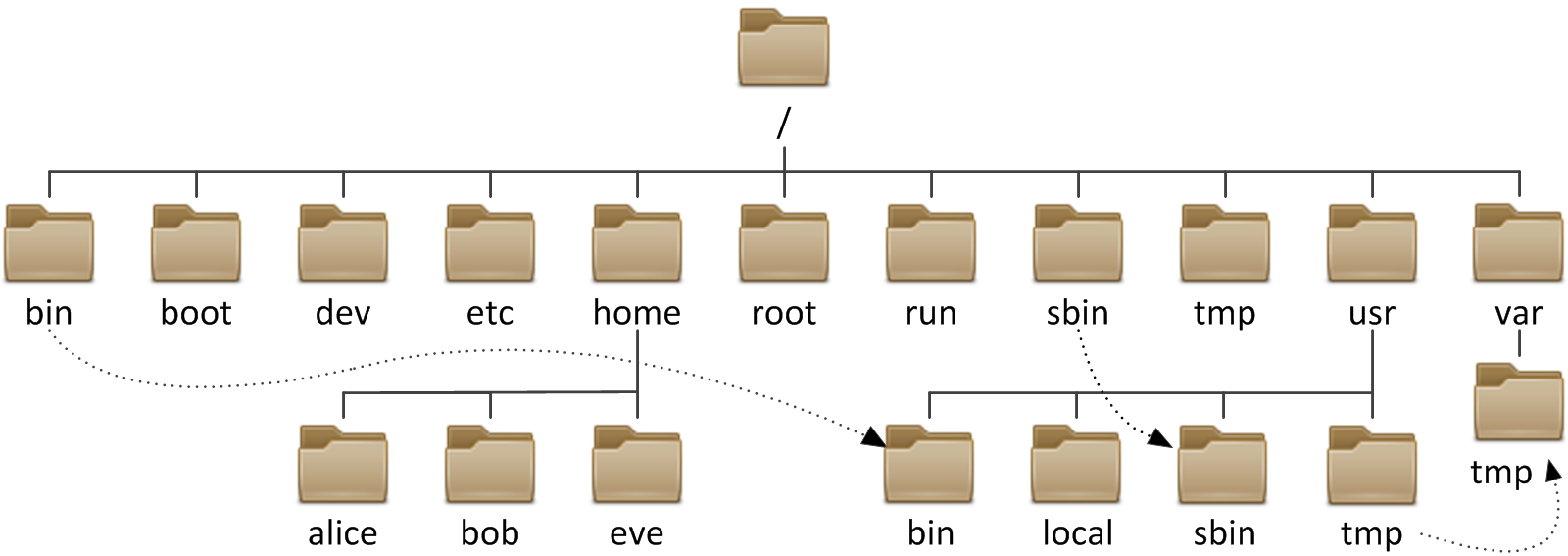
File system hierarchy
Basic Linux commands:-
Listing commands
ls option_flag arguments --> list the subdirectories and files available in the present directory.
Examples:
ls -l--> List the files and directories in long list format with extra informationls -a--> List all including hidden files and directoryls *.sh--> List all the files having .sh extension.ls -i--> List the files and directories with index numbers in Inodesls -d */--> List only directories.(we can also specify a pattern)
Directory commands
pwd--> Print work directory. Gives the present working directory.cd path_to_directory--> Change directory to the provided pathcd ~or justcd--> Change directory to the home directorycd ---> Go to the last working directory.cd ..--> Change directory to one step back.cd ../..--> Change directory to 2 levels back.mkdir directoryName--> To make a directory in a specific location.
Examples:
mkdir newFolder              # make a new folder 'newFolder'

mkdir .NewFolder          # make a hidden directory (also . before a                               file to make it hidden)

mkdir A B C D                 #make multiple directories at the same time

mkdir /home/user/Mydirectory   # make a new folder in a specific location

mkdir -p  A/B/C/D              # make a nested directory


