Advance Git & GitHub for DevOps Engineers: Part-2
Day 11 : #90DaysOfDevOps Challenge
Git Stash:-
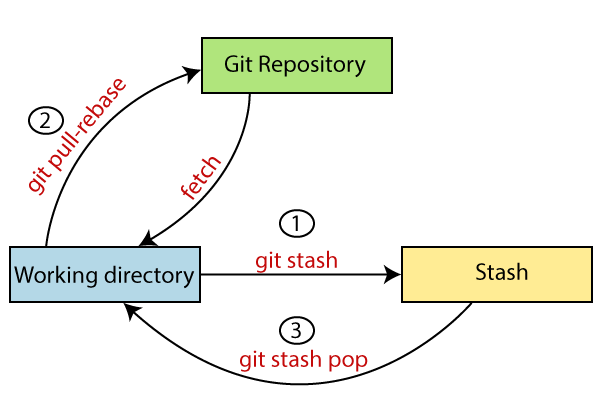
git stash temporarily shelves (or stashes) changes you've made to your working copy so you can work on something else, and then come back and re-apply them later on. Stashing is handy if you need to quickly switch context and work on something else, but you're mid-way through a code change and aren't quite ready to commit.
The git stash command takes your uncommitted changes (both staged and unstaged), saves them away for later use, and then reverts them from your working copy
Command:-
git stash
or
git stash -u
Once you are back and want to retrieve working need to type the below command:
git stash pop
Cherry-pick:-
git cherry-pick is a powerful command that enables arbitrary Git commits to be picked by reference and appended to the current working HEAD. Cherry picking is the act of picking a commit from a branch and applying it to another. git cherry-pick can be useful for undoing changes. For example, say a commit is accidentally made to the wrong branch. You can switch to the correct branch and cherry-pick the commit to where it should belong.
git cherry-pick is a useful tool but not always a best practice. Cherry-picking can cause duplicate commits and in many scenarios where cherry-picking would work, traditional merges are preferred instead. With that said git cherry-pick is a handy tool for a few scenarios...
Command:-
git cherry-pick <Commit_Id>

Resolving Conflicts:-
When two branches are trying to merge, and both are edited at the same time and in the same file, Git won't be able to identify which version to take for changes. Such a situation is called a merge conflict. If such a situation occurs, it stops just before the merge commit so that you can resolve the conflicts manually.

Task-01
Create a new branch and make some changes to it.
Use git stash to save the changes without committing them.
Switch to a different branch, make some changes and commit them.
Use git stash pop to bring the changes back and apply them on top of the new commits.
Here are the steps to complete the task:
Create a new branch using the following command:
git checkout -b my-new-branch

Make some changes to the new branch, such as adding or modifying code files.
Use git stash to save the changes without committing them, using the following command:
git stash save "My new branch changes"Switch to a different branch, such as the main branch, using the following command:
git checkout main

Make some changes to the main branch, such as adding or modifying code files.
Commit the changes to the main branch using the following command:
  git add .
  git commit -m "Commit message"

Use
git stash popto bring the changes back and apply them on top of the new commits, using the following command:git stash pop
Resolve any conflicts that may arise, using the steps outlined in the previous answer.
Review the changes and commit them to the main branch if they are correct, using the following commands:
  git add .
  git commit -m "My new branch changes applied to main branch"
Push the changes to the remote repository, using the following command:
git push origin mainAnd that's it! You've successfully created a new branch, made changes to it, switched to a different branch, made changes and committed them, and applied the new branch changes on top of the new commits using git stash.
Task 2:-
In version01.txt of the development branch add the below lines after “This is the bug fix in development branch” that you added in Day10 and reverted to this commit.
Line2>> After bug fixing, this is the new feature with minor alterations”
Commit this with the message “ Added feature2.1 in development branch”
Line3>> This is the advancement of the previous feature
Commit this with the message “ Added feature2.2 in development branch”
Line4>> Feature 2 is completed and ready for release
Commit this with the message “ Feature2 completed”
All these commits messages should be reflected in the Production branch too which will come out from the Master branch (Hint: try rebase).
here are the steps to complete the task:
- Initialize a new Git repository by running the following command in the terminal:
Here are the steps to complete the task:
git init
- Create a new file called version01.txt by running the following command:
touch version01.txt
- Open version01.txt in a text editor and add the following line:
This is the bug fix in development branch
- Commit the changes with the message "Initial commit" using the following commands:
    git add .
    git commit -m "Initial commit"
- Add the following line to version01.txt:
After bug fixing, this is the new feature with minor alteration
- Commit the changes with the message "Added feature2.1 in development branch" using the following commands:
    add .
    git commit -m "Added feature2.1 in development branch"
- Add the following line to version01.txt:
This is the advancement of previous feature
- Commit the changes with the message "Added feature2.2 in development branch" using the following commands:
    git add .
    git commit -m "Added feature2.2 in development branch"
- Add the following line to version01.txt:
Feature 2 is completed and ready for release
- Commit the changes with the message "Feature2 completed" using the following commands:
    git add .
    git commit -m "Feature2 completed"
- Create a new branch called production from the master branch using the following command:
    git checkout master
    git branch production
- Switch to the production branch using the following command:
git checkout production
- Merge the changes from the development branch to the production branch using the following command:
git merge --no-ff development
- Rebase the commits in the production branch with the commits in the development branch using the following command:
git rebase development
- Push the changes to the remote repository using the following command:
git push origin production
And that's it! You've successfully added new lines to version01.txt, committed them with appropriate messages, created a production branch from the master branch, merged the changes from the development branch to the production branch, and rebased the commits in the production branch with the commits in the development branch.
Task 3:-
In the Production branch Cherry pick Commit “Added feature2.2 in development branch” and added the below lines in it:
The line to be added after Line3>> This is the advancement of the previous feature
Line 4>>Added a few more changes to make it more optimized.
Commit: Optimized the feature
Here are the steps to complete the task:
- Make sure you have the latest version of the production branch by running the following command:
    git checkout production
    git pull origin production
- Cherry-pick the commit "Added feature2.2 in development branch" using the following command:
git cherry-pick <commit-hash>
Note: Replace <commit-hash> with the actual hash of the commit you want to cherry-pick. You can get the commit hash by running git log and finding the commit you want.
- Open the version01.txt file in a text editor and add the following line after "This is the advancement of the previous feature":
Added few more changes to make it more optimized.
- Commit the changes with the message "Optimized the feature" using the following commands:
    git add .
    git commit -m "Optimized the feature"
- Push the changes to the remote repository using the following command:
git push origin production
And that's it! You've successfully cherry-picked a commit from the development branch to the production branch and added new lines to it.


